The short version
THE TL;DR
- Choose REW if you want the deepest analysis available, for free, on a Windows, Mac or Linux computer, or your AV receiver or DSP has built-in REW support.
- Choose Audiophilio if you want to measure from the listening seat with the device already in your hand, and you want room design, system advice and turntable setup in the same app.
- Already use REW? You don't start over. Audiophilio reads and writes REW's text format and loads your mic's calibration file, so your measurements move with you in either direction.
What REW is
REW (Room EQ Wizard) is free room-acoustics measurement and analysis software. Its own homepage describes it as "free professional-grade tools" for measuring rooms, speakers, subwoofers and audio devices, finding the best positions for speakers and listeners, and configuring EQ. It is a Java application with downloads for Windows, macOS and Linux. There is no iPhone or iPad version.
REW is free, and the developer accepts donations. A separate Pro upgrade adds simultaneous multi-input measurement with RMS averaging, plus Speech Transmission Index calculation. Support runs through the AV Nirvana forum, which is where most of the practical know-how lives. The usual hardware is a calibrated USB microphone (REW recommends the miniDSP UMIK-1) and your computer's audio output.
What Audiophilio is
Audiophilio is a toolkit for iPhone, iPad and Mac. Measurement is one part of it: SPL meter, real-time analyzer, LUFS meter, waterfall and spectrogram, RT60, energy-time curve, channel balance, THD+N, impedance, polarity, delay finder, wow & flutter and a log-sweep frequency response tool. Around that sit a Room Designer (standing-wave heat maps, first-reflection analysis, LiDAR room scanning), a System Builder with plain-English diagnosis, a turntable setup suite, an ear trainer and eleven acoustic calculators.
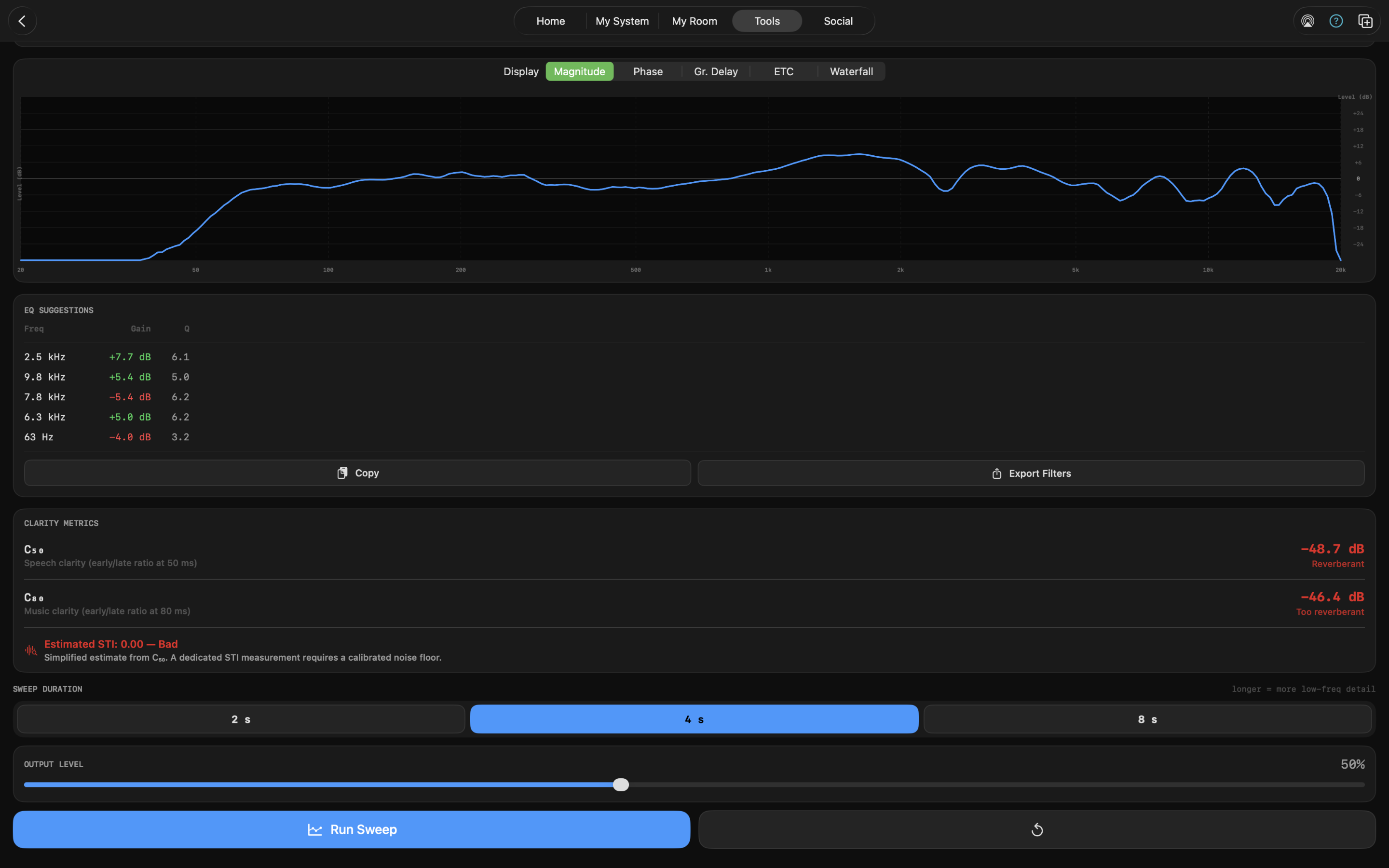
Audiophilio 2.0, a free update released in November 2026, deepens the Frequency Response & PEQ and RT60 tools: impulse and step response, minimum and excess phase, guided multi-seat capture with power averaging, full ISO 3382 decay and clarity, room-mode filters, STI, and FIR and CamillaDSP export.
Pricing is a free tier (SPL meter, noise generator, calculators, one room and one system) and a one-time $44.99 Premium unlock for everything else, including the frequency response and EQ tool. No subscription, no ads, no tracking.
Where REW is better
This is the section I would want to read if I were choosing between them, so I am not going to soften it.
- Depth. REW gives you finer control over every part of the process. Audiophilio 2.0 closed the biggest gaps with impulse and step response, minimum and excess phase, power (RMS) averaging and full decay and clarity metrics. REW still keeps tools Audiophilio doesn't have yet, such as adjustable impulse windows, trace arithmetic, intermodulation distortion and a tunable auto-EQ. All four are on Audiophilio's roadmap after 2.0.
- Price. It is free. Nothing I build changes that.
- Hardware integration. REW can generate and send filters directly to a wide range of AV receivers and DSPs. Audiophilio exports a filter file that you load yourself, including CamillaDSP and FIR convolution formats, but sending filters directly isn't planned: on Apple devices Audiophilio could only reach gear that speaks MIDI or a published network protocol, a small part of REW's list.
- Ecosystem. Years of tutorials, forum threads and third-party tooling are built around REW. When something looks odd, someone has already asked about it on AV Nirvana.
- Pro-level measurement. Multi-input measurement and Speech Transmission Index are in REW's Pro upgrade. Audiophilio 2.0 computes STI from the impulse response to IEC 60268-16, included with Premium. Simultaneous multi-input capture isn't planned, because it needs a multichannel audio interface. Instead, Audiophilio's guided multi-position capture averages several seats with a single mic.
Where Audiophilio is better
- It runs where you are. Measuring a room usually means moving a mic, then walking back to read a screen. With a phone or iPad you hold the screen and the mic together, and you see the change at the listening seat as you move a speaker or a panel.
- A gentler on-ramp. There is a guided first measurement, and the built-in mic works with every tool out of the box. That is enough for the most useful early work: spotting room modes, comparing before and after treatment, and checking channel balance.
- Guided multi-seat capture. Audiophilio walks you through 3 to 9 seats, saves each sweep, averages them and reports how much the bass varies from seat to seat. In REW you take and average the measurements yourself.
- More than measurement. The Room Designer predicts standing-wave behavior and first reflections before you buy anything. System Diagnosis reads your RT60, channel balance, distortion, polarity and impedance results and ranks the problems with plain-English fixes. The turntable suite handles tonearm alignment and speed stability. REW does not try to do any of that.
- One-time price, no accounts. No subscription, no ads, no tracking.
Measurement quality comes down to hardware
Neither app can make a bad microphone good. The microphone and the signal path matter more than the software on top of them, which is true for REW and for Audiophilio alike.
The built-in mic on an iPhone, iPad or Mac is fine for relative measurements, where you compare one curve with another. Its own frequency response is not flat, and no calibration file can fix that, so it is not the right tool for absolute SPL or a trustworthy flat curve. A calibrated UMIK-1 with its calibration file loaded is. The Hardware Guide covers mics, USB-C hubs and cables, and which tools are affected by wireless latency (timing-sensitive tools like Delay Finder, ETC and RT60 are; level-based tools are not).
One more point, because both communities should say it plainly: EQ is not a cure for a bad room. REW's own site notes that EQ can help at the listening position "subject to some limitations", and the same is true here. Placement and treatment come first, then EQ.
Moving between them
Audiophilio doesn't need REW to finish the job. It measures, analyzes, builds EQ and exports filters on its own. It also speaks REW's file format, so switching doesn't mean starting over, and you can move files back and forth whenever you like.
- Bring your REW library. Import measurements you took in REW (frequency, level and phase where available) and overlay them against fresh sweeps from your phone, so earlier work carries straight over.
- Keep your calibration. Load the same REW or miniDSP .cal file you already use with your UMIK-1.
- Do the whole job in Audiophilio. Measure at the seat, generate parametric EQ toward Flat, Harman, a house curve or your own target, and export it in REW / Generic, miniDSP biquad or Equalizer APO format.
- Share with REW users. Export any Audiophilio measurement as REW text, so a friend, a forum thread or your own desktop setup can open it in REW.
Since 2.0, more of the analysis stays in Audiophilio too. The full comparison tracks it against every REW feature.
Which should you pick?
Is Audiophilio a replacement for REW?
No, not yet, but 2.0 is a big step toward it. REW is free and still goes deeper on analysis, while Audiophilio is a broader, more approachable toolkit that runs on Apple devices. 2.0 closed the gaps that matter most for tuning a room, and the full comparison shows where Audiophilio stands on every REW feature. And since Audiophilio reads and writes REW's text format, you can switch without leaving your measurements behind, or keep using both.
Can I import my REW measurements into Audiophilio?
Yes. Audiophilio reads REW-compatible text files (frequency, level and, if present, phase) and overlays them against your other measurements. You can also export Audiophilio measurements in the same format.
Does REW run on iPhone or iPad?
REW's download page lists Windows, macOS and Linux builds only. There is no iOS or iPadOS version.
Which one is more accurate?
Both measure with log sweeps, and in practice your microphone and signal path dominate the result. I have not published a head-to-head accuracy test, so treat any blanket claim of "X is more accurate than Y", from me or anyone else, with suspicion unless it comes with data. Where they differ is what you can do with the measurement afterward: REW offers more control and analysis, and 2.0 narrowed that gap.
Is the built-in microphone good enough?
For relative measurements, yes: room modes, before/after comparisons and channel balance. For absolute SPL or a flat frequency-response curve, use a calibrated mic such as the UMIK-1. See the Hardware Guide.
What does Audiophilio cost?
The SPL meter, noise generator, calculators, one room and one system are free. A one-time $44.99 Premium purchase unlocks everything else, including the frequency response and EQ tool. There is no subscription.
Try it
The free tier includes the SPL meter, and a guided first measurement walks you through your first reading. If you already use REW, import one of your measurements and see how it looks next to a fresh one from your phone.
DOWNLOAD ON THE APP STORE
Sources
REW facts in this article come from roomeqwizard.com (platforms, price and donations, Pro upgrade, recommended hardware, EQ caveat), checked October 9, 2026, plus REW's published description of its sweep-based measurement and analysis views. Audiophilio facts come from the app itself and its changelog. Software changes; check each tool's own site for current details.