The short version
THE TL;DR
- Choose REW if you want the deepest analysis available, for free, on a Windows, Mac or Linux computer, or your AV receiver or DSP has built-in REW support.
- Choose Audiophilio if you want to measure from the listening seat with the device already in your hand, and you want room design, system advice and turntable setup in the same app.
- Use both if you are serious. They trade measurement files in REW's text format, so nothing you measure in one is stranded.
What REW is
REW (Room EQ Wizard) is free room-acoustics measurement and analysis software. Its own homepage describes it as "free professional-grade tools" for measuring rooms, speakers, subwoofers and audio devices, finding the best positions for speakers and listeners, and configuring EQ. It is a Java application with downloads for Windows, macOS and Linux. There is no iPhone or iPad version.
REW is free, and the developer accepts donations. A separate Pro upgrade adds simultaneous multi-input measurement with RMS averaging, plus Speech Transmission Index calculation. Support runs through the AV Nirvana forum, which is where most of the practical know-how lives. The usual hardware is a calibrated USB microphone (REW recommends the miniDSP UMIK-1) and your computer's audio output.
What Audiophilio is
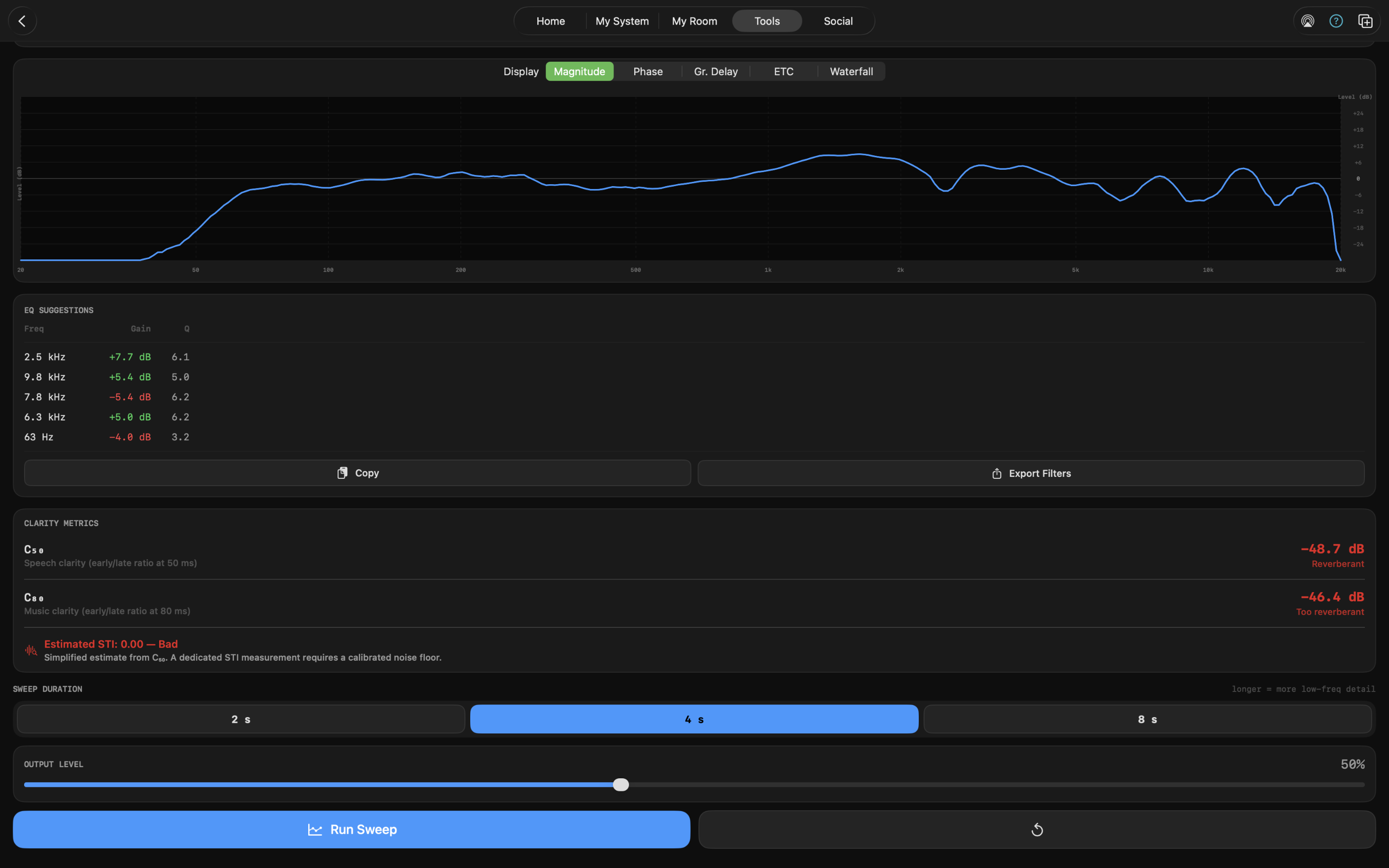
Audiophilio is a toolkit for iPhone, iPad and Mac. Measurement is one part of it: SPL meter, real-time analyzer, LUFS meter, waterfall and spectrogram, RT60, energy-time curve, channel balance, THD+N, impedance, polarity, delay finder, wow & flutter and a log-sweep frequency response tool. Around that sit a Room Designer (standing-wave heat maps, first-reflection analysis, LiDAR room scanning), a System Builder with plain-English diagnosis, a turntable setup suite, an ear trainer and eleven acoustic calculators.
Pricing is a free tier (SPL meter, noise generator, calculators, one room and one system) and a one-time $44.99 Premium unlock for everything else, including the frequency response and EQ tool. No subscription, no ads, no tracking.
Where REW is better
This is the section I would want to read if I were choosing between them, so I am not going to soften it.
- Depth. REW exposes impulse and step response, runs distortion analysis inside the sweep, averages many measurements, and offers far finer control over every part of the process. Audiophilio computes an impulse response internally but shows you the energy-time curve rather than the raw response, and it does not have a step-response view.
- Price. It is free. Nothing I build changes that.
- Hardware integration. REW can generate and send filters directly to a wide range of AV receivers and DSPs. Audiophilio exports text filters that you enter yourself.
- Ecosystem. Years of tutorials, forum threads and third-party tooling are built around REW. When something looks odd, someone has already asked about it on AV Nirvana.
- Pro-level measurement. Multi-input measurement and Speech Transmission Index are in REW's Pro upgrade. Audiophilio has nothing comparable.
Where Audiophilio is better
- It runs where you are. Measuring a room usually means moving a mic, then walking back to read a screen. With a phone or iPad you hold the screen and the mic together, and you see the change at the listening seat as you move a speaker or a panel.
- A gentler on-ramp. There is a guided first measurement, and the built-in mic works with every tool out of the box. That is enough for the most useful early work: spotting room modes, comparing before and after treatment, and checking channel balance.
- More than measurement. The Room Designer predicts standing-wave behavior and first reflections before you buy anything. System Diagnosis reads your RT60, channel balance, distortion, polarity and impedance results and ranks the problems with plain-English fixes. The turntable suite handles tonearm alignment and speed stability. REW does not try to do any of that.
- One-time price, no accounts. No subscription, no ads, no tracking.
Measurement quality comes down to hardware
Neither app can make a bad microphone good. The microphone and the signal path matter more than the software on top of them, which is true for REW and for Audiophilio alike.
The built-in mic on an iPhone, iPad or Mac is fine for relative measurements, where you compare one curve with another. Its own frequency response is not flat, and no calibration file can fix that, so it is not the right tool for absolute SPL or a trustworthy flat curve. A calibrated UMIK-1 with its calibration file loaded is. The Hardware Guide covers mics, USB-C hubs and cables, and which tools are affected by wireless latency (timing-sensitive tools like Delay Finder, ETC and RT60 are; level-based tools are not).
One more point, because both communities should say it plainly: EQ is not a cure for a bad room. REW's own site notes that EQ can help at the listening position "subject to some limitations", and the same is true here. Placement and treatment come first, then EQ.
Using them together
You do not have to pick. Audiophilio imports and exports measurements as REW-compatible text (frequency, level, and phase where available), so the two tools can share data.
- Explore with Audiophilio. Use the RTA, waterfall and RT60 tools to find the worst modes while you move speakers and try treatment. Overlay saved measurements to see what each change did.
- Go deeper in REW. Export a measurement from Audiophilio and open it in REW for impulse-response and distortion work.
- Bring REW data back. Import measurements taken in REW to overlay against fresh ones from your phone.
- Export your filters. Generate parametric EQ in Audiophilio and export it in REW / Generic, miniDSP biquad or Equalizer APO format.
Which should you pick?
Start with REW
You are building a dedicated home theater, you want filters pushed to an AVR or DSP, you are doing multi-position averaging or multi-sub work, or you need pro-level analysis like multi-input measurement and STI. You are comfortable at a desktop and a forum.
Start with Audiophilio
You are a two-channel listener who wants to understand your room, place speakers, tame a boomy mode, or set up a turntable. You want one app that measures, explains and designs, and you would rather not set up a laptop and an audio interface first.
Use both
You are a serious hobbyist. Explore and iterate with the device in your hand, then take the keepers into REW for the analysis only it can do. Move files between them in REW text format.
Is Audiophilio a replacement for REW?
No, and it is not trying to be. REW goes deeper on analysis and is free. Audiophilio is a broader, more approachable toolkit that runs on Apple devices. Plenty of people will want both.
Can I import my REW measurements into Audiophilio?
Yes. Audiophilio reads REW-compatible text files (frequency, level and, if present, phase) and overlays them against your other measurements. You can also export Audiophilio measurements in the same format.
Does REW run on iPhone or iPad?
REW's download page lists Windows, macOS and Linux builds only. There is no iOS or iPadOS version.
Which one is more accurate?
Both measure with log sweeps, and in practice your microphone and signal path dominate the result. I have not published a head-to-head accuracy test, so treat any blanket claim of "X is more accurate than Y", from me or anyone else, with suspicion unless it comes with data. What I can say is that REW gives you more control and more analysis on top of the measurement.
Is the built-in microphone good enough?
For relative measurements, yes: room modes, before/after comparisons and channel balance. For absolute SPL or a flat frequency-response curve, use a calibrated mic such as the UMIK-1. See the Hardware Guide.
What does Audiophilio cost?
The SPL meter, noise generator, calculators, one room and one system are free. A one-time $44.99 Premium purchase unlocks everything else, including the frequency response and EQ tool. There is no subscription.
Try it
The free tier includes the SPL meter, and a guided first measurement walks you through your first reading. If you already use REW, import one of your measurements and see how it looks next to a fresh one from your phone.
DOWNLOAD ON THE APP STORE
Sources
REW facts in this article come from roomeqwizard.com (platforms, price and donations, Pro upgrade, recommended hardware, EQ caveat), checked October 9, 2026, plus REW's published description of its sweep-based measurement and analysis views. Audiophilio facts come from the app itself and its changelog. Software changes; check each tool's own site for current details.